Sort five dinners
Chop it, plan five dinners for four people: two chicken, one fish and two red meat. Show me recipe choices.
Choose your dinners, then ask to save.
Chop it in ChatGPT
Save that recipe. Change next week’s dinners. Make something of what’s left in the fridge. Tell Chop it what you need in ChatGPT, then open the saved results on your phone.
ChatGPT does the admin.
Chop it keeps everything organised.
Free to plan, adapt and organise in ChatGPT. No Chop it Pro subscription needed. ChatGPT’s own usage limits apply. Import charges explained below.
Start with one small job
Copy a request, open Chop it in ChatGPT and make it your own. These are examples to try, not actions that have already run.
Chop it, plan five dinners for four people: two chicken, one fish and two red meat. Show me recipe choices.
Choose your dinners, then ask to save.
Chop it, I didn’t cook the chicken curry from last week. Help me choose the right week, add that dinner to a new five-dinner week for four people and suggest the other four. Leave the old week and its recipes alone.
Connect your account and choose the old week.
Chop it, help me choose a favourite Saved Week and make a fresh version. Keep the two chicken dinners, suggest changes to the others and save it separately. Save any adapted recipes as new copies too.
Choose a Saved Week with two chicken dinners.
Chop it, help me turn this recipe screenshot into a recipe I can cook from. Read it with me, check anything unclear and save the agreed recipe in Chop it.
Add a recipe screenshot in ChatGPT.
Chop it, help me update my pantry from these fridge, freezer and cupboard photos. Check unclear items and quantities with me before saving. Don’t guess freshness or expiry dates.
Add your photos in ChatGPT.
Chop it, help me choose a Saved Week and create a share link so I can send it to a friend. Show me what anyone with the link will be able to see before sharing.
Connect your account and choose a week.
Chop it, make a new version of this Saved Week with more different plants and aim for at least 10g of fibre per serving in each dinner. Keep it practical, show me the changes and check the available nutrition estimates. Save changed recipes and the week as new copies.
Choose a week. The fibre target is not a guarantee.
Chop it, make a vegetarian version of this Saved Week. Keep the flavours we like and save it separately, with new copies of any recipes you adapt.
Choose a Saved Week.
Chop it, help me save this recipe from the link. Tell me if importing will save it first, then suggest alternatives to ingredients I don’t have and adjust the recipe for four people.
Paste a recipe link and say what’s missing.
Chop it, add this week’s veg-box contents to my pantry after checking the items and quantities with me, and suggest dinners that use them alongside what I already have.
Add a photo or type the contents.
Chop it, these are the ingredients left from my HelloFresh or Gousto meals. Suggest something different to cook with them.
List the ingredients or add a photo.
Chop it, show me a selection of my saved recipes and let me choose which tags and descriptions to tidy. Show me the changes first. Keep the ingredients and methods unchanged.
A selection, not a promise to review the whole library.
Chop it, change this saved recipe to serve four, suggest a replacement for the cream and update the ingredients and method together. Show me the changes before updating it.
Choose one of your saved recipes.
Chop it, open this shared week, help me adapt it for four people and save my own copy. Keep my friend’s week unchanged.
Paste a shared-week link in ChatGPT.
Chop it, prepare a shopping review for my latest selected dinners. Check the quantities I already have with me and include what I still need to buy.
Choose a completed week and confirm your stock.
From the conversation to dinner
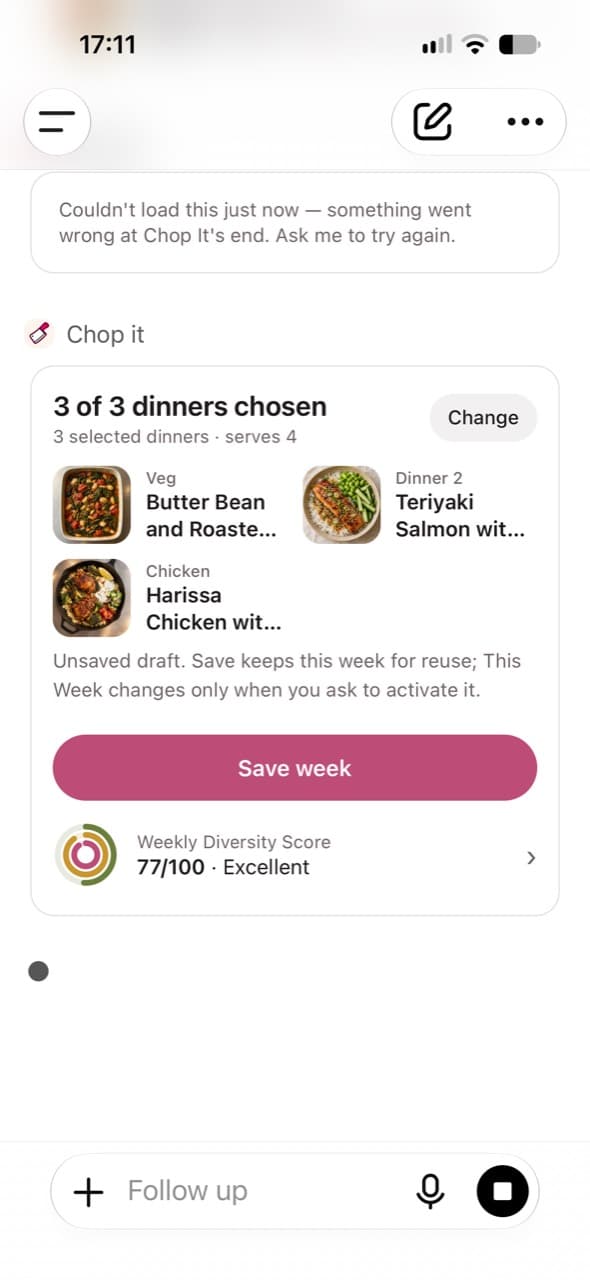
Choose dinners in ChatGPT, ask to save the week and open the saved result in Chop it. Making it This Week is a separate choice.
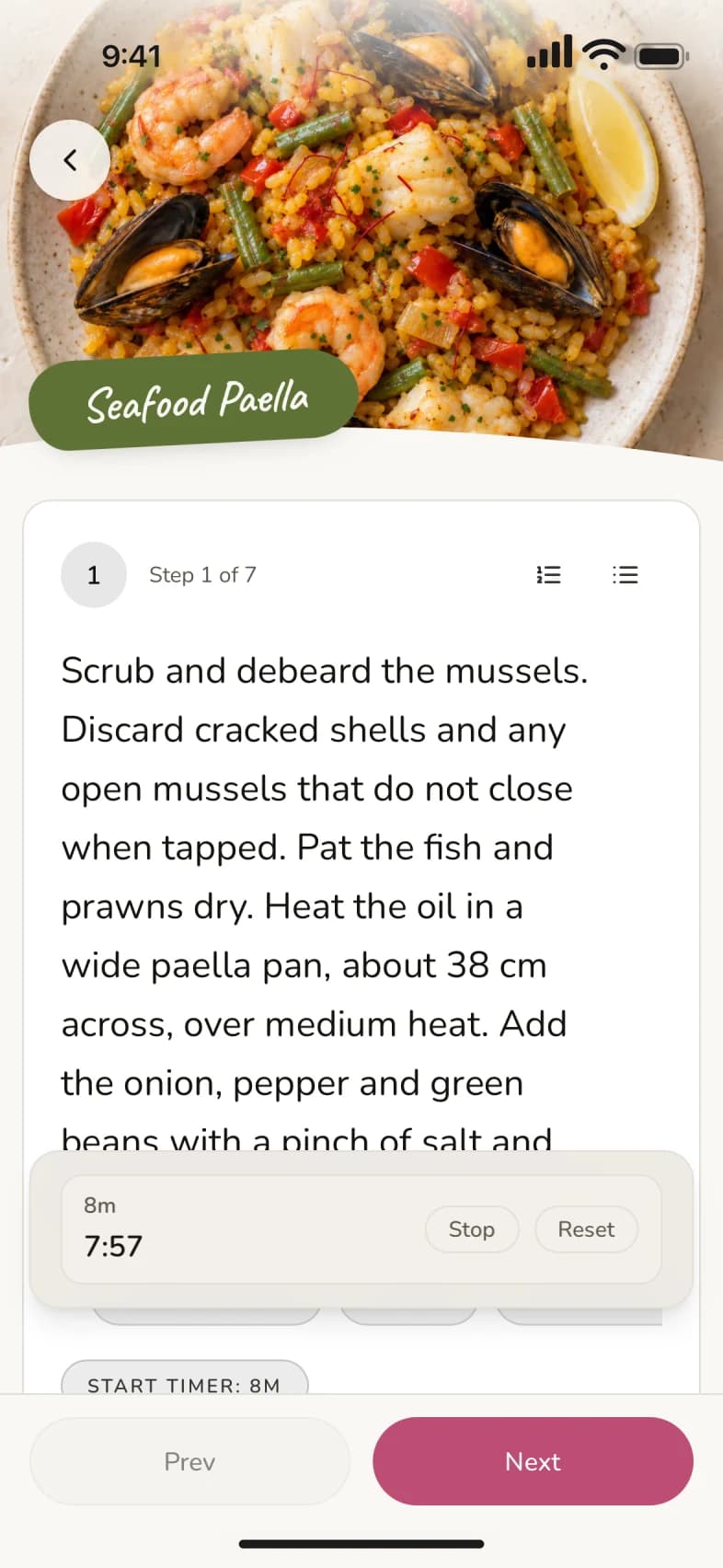
Two captures combined into one screen: the request and the resulting dinner draft. The draft is not yet saved. The next screen shows Cook mode separately in the mobile app.
How the same account connects them ↓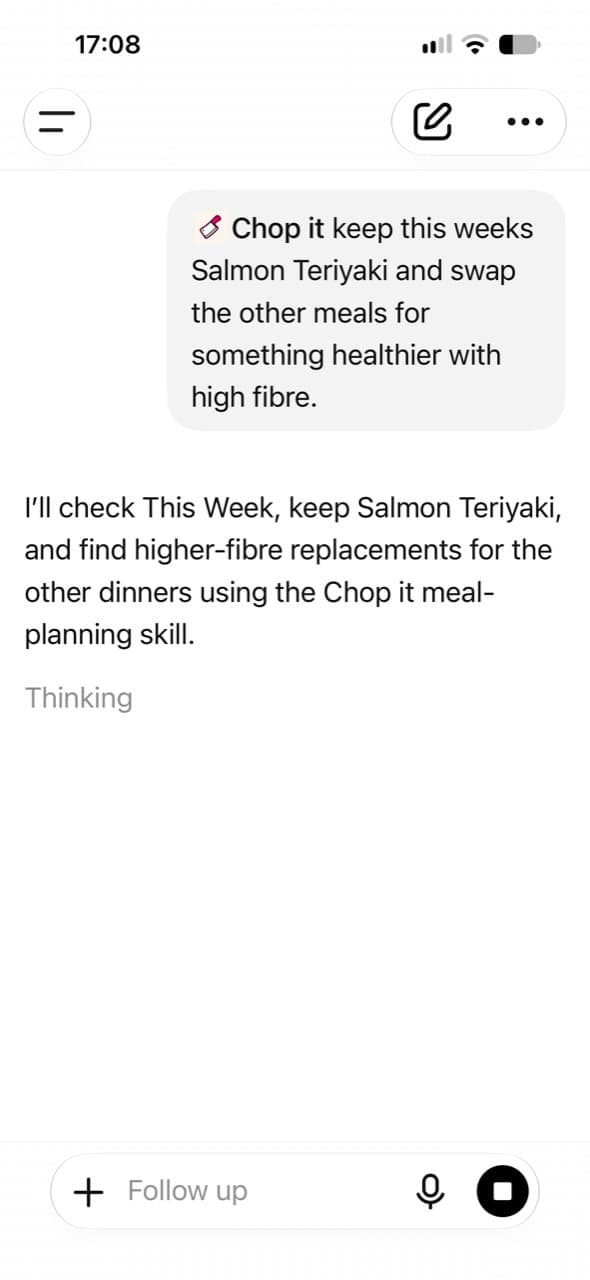

More than dinner ideas
Bring a recipe link, a screenshot or a photo of a cookbook page. Discuss substitutions, portions and the flavours you want, then keep a usable recipe in your Chop it library.
Chop it’s website and social-link imports save immediately when successful. You can edit that saved recipe afterwards. For changes before the first save, ask ChatGPT to read the recipe text or photo, develop it with you and save the agreed version. Some links cannot be read: paste the recipe text or add a screenshot instead.
Carry an uncooked dinner forward. Reopen a favourite Saved Week, keep the good bits and choose something different for the rest. Save the new week separately, then make it This Week when you’re ready to cook.
Say which week you mean, or choose from your Saved Weeks. A fresh plan keeps the old plan. If you change a recipe itself, ask for a new recipe copy too: two plans can use the same recipe.
Ask for more plant variety, a vegetarian version or more fibre using recipes you already like. Discuss the changes before keeping them, with ingredients and cooking steps updated together.
Nutrition figures are calculated estimates, not guarantees. A fibre target is something to check, not a promised result. Chop it is not an allergy or medical-diet tool. Keep changed recipes as new copies when preserving the originals.
Give a saved recipe a clearer title. Tidy its tags and description. Change the servings or replace an ingredient and update the method to match.
Choose the recipes to change and review the scope first. ChatGPT’s library results can be a limited selection, so don’t assume it has reviewed every recipe. Use the mobile app to rename Saved Weeks while that action is unavailable in the installed ChatGPT connection.
Show ChatGPT your fridge, freezer or cupboard photos. Ask it to check uncertain items with you and add the agreed contents to your Chop it pantry. A veg box, a meat or fish delivery, dairy or leftover HelloFresh and Gousto ingredients can be the starting point for dinner.
ChatGPT reads the photo; Chop it stores the items you agree. Confirm quantities and unclear labels. A photo cannot establish freshness or an unseen expiry date. Some everyday staples are filtered out, so check the saved result rather than assuming every spice or item was added.
Ask Chop it for a share link to a Saved Week, then send it to a friend. They can preview it, save their own copy and change it to suit their household.
Anyone with the link can view the shared week and its recipes. Share only what you mean to make available. Importing creates the recipient’s copy; it is not a jointly edited plan or a social feed. For a single recipe share link, use the mobile app.
Combine the ingredients for your chosen dinners, scaled to the people you’re feeding. Confirm how much you already have, then open Chop it’s supermarket review for what you still need.
The review links to searches at Tesco, Sainsbury’s, Asda, Morrisons, Ocado and Waitrose. It does not add products to a basket, check live prices or place an order. Ask for a fresh shopping list after changing dinners; a pantry match alone does not prove you have enough.
One account
Can’t find it? Search for Chop it under Plugins, or Apps if that’s what your ChatGPT account shows. Workspace restrictions may affect access. OpenAI’s connection guide.
Connect a free Chop it account to save recipes and weeks, use your own library, update your pantry and prepare shopping. Sign in to the same account in the iPhone or Android app to use the saved results in the kitchen or on the go.
You can search recipes and draft dinner choices before connecting. Only work successfully saved to Chop it becomes account data. Unsaved conversation text does not appear in the apps. Chop it’s full cooking experience is in the mobile apps.
When ChatGPT writes or adapts a recipe, or reads a pantry photo, it does that work in the conversation. Saving the structured recipe, editing your records and updating your pantry through the connected tools do not spend Chop it credits.
Chop it’s own recipe-import tools are different: the first 10 completed imports per account each week are free across the app and ChatGPT, then each costs 1 credit with your agreement. ChatGPT’s import tools are also capped at 5 attempts per session, including failed attempts. In-app Make me a recipe and Scan ingredients each cost 1 credit. ChatGPT’s message, photo and other limits still apply, and availability can depend on your plan and workspace. This is not free, unlimited access to every in-app AI job.
Check that Chop it confirmed the save and that you connected the same account you use on your phone. A suggested dinner is still a suggestion until you choose and save it. Ask Chop it to read back the saved recipe or week.
Ask it to check the tools available in your connection. An action may be available in the mobile app before it reaches the installed ChatGPT connection. If the connection itself is unavailable, check your ChatGPT workspace settings or use the mobile app.
Run a food business? See Chop it for food boxes, meal kits and food brands →