Best Meal Planning Apps in the UK for 2026

Contents
Quick verdicts
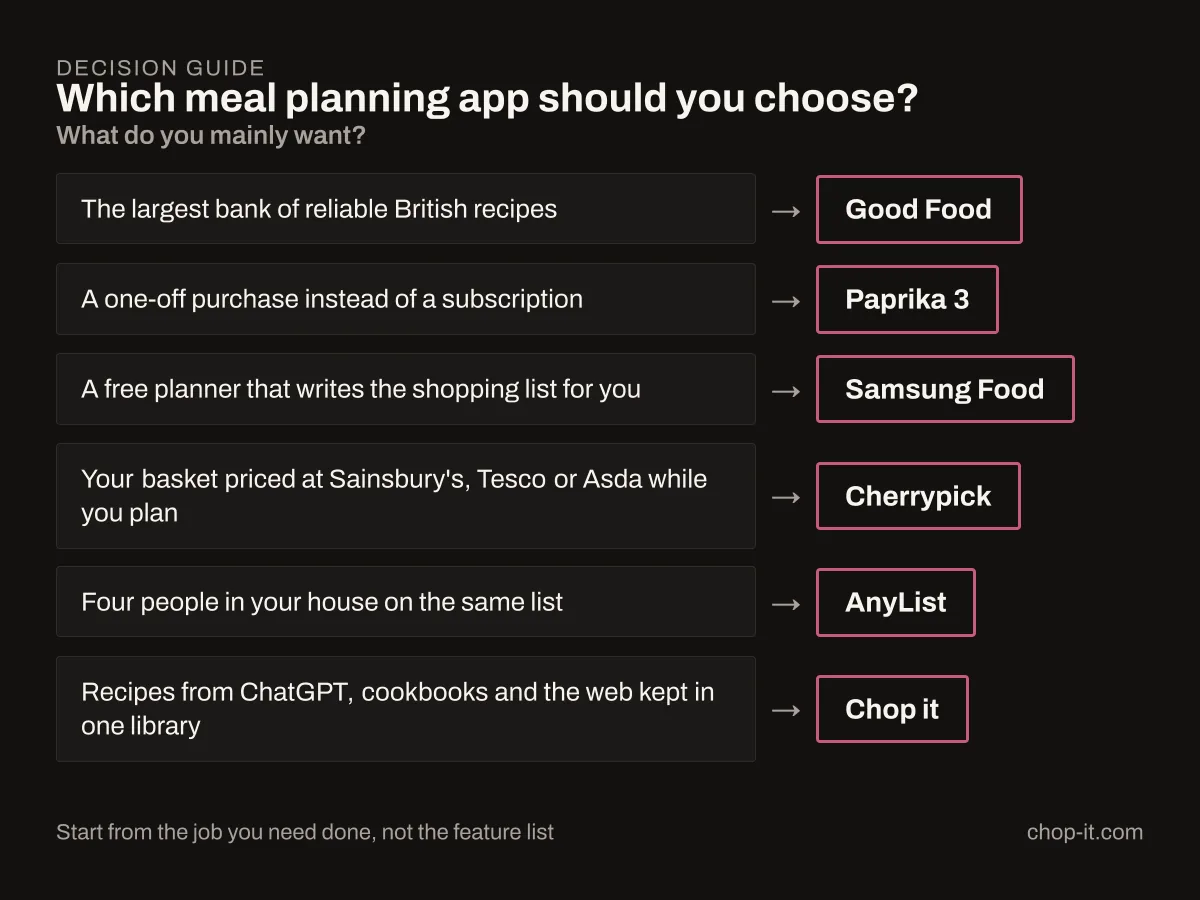
- Best for reliable British recipes: Good Food.
- Best one-off purchase: Paprika 3 on the platform you buy it for.
- Best free all-round planner: Samsung Food.
- Best for a priced UK supermarket basket: Cherrypick.
- Best shared household list: AnyList.
- Best for recipes from ChatGPT, cookbooks, social video and the web: Chop it.
We built Chop it. The other nine were assessed from their App Store listings, current pricing pages and published user reviews; Chop it was scored against the same criteria. I have not lived inside every competitor for a month, and I am not going to write as though I had.
The UK meal planning apps compared
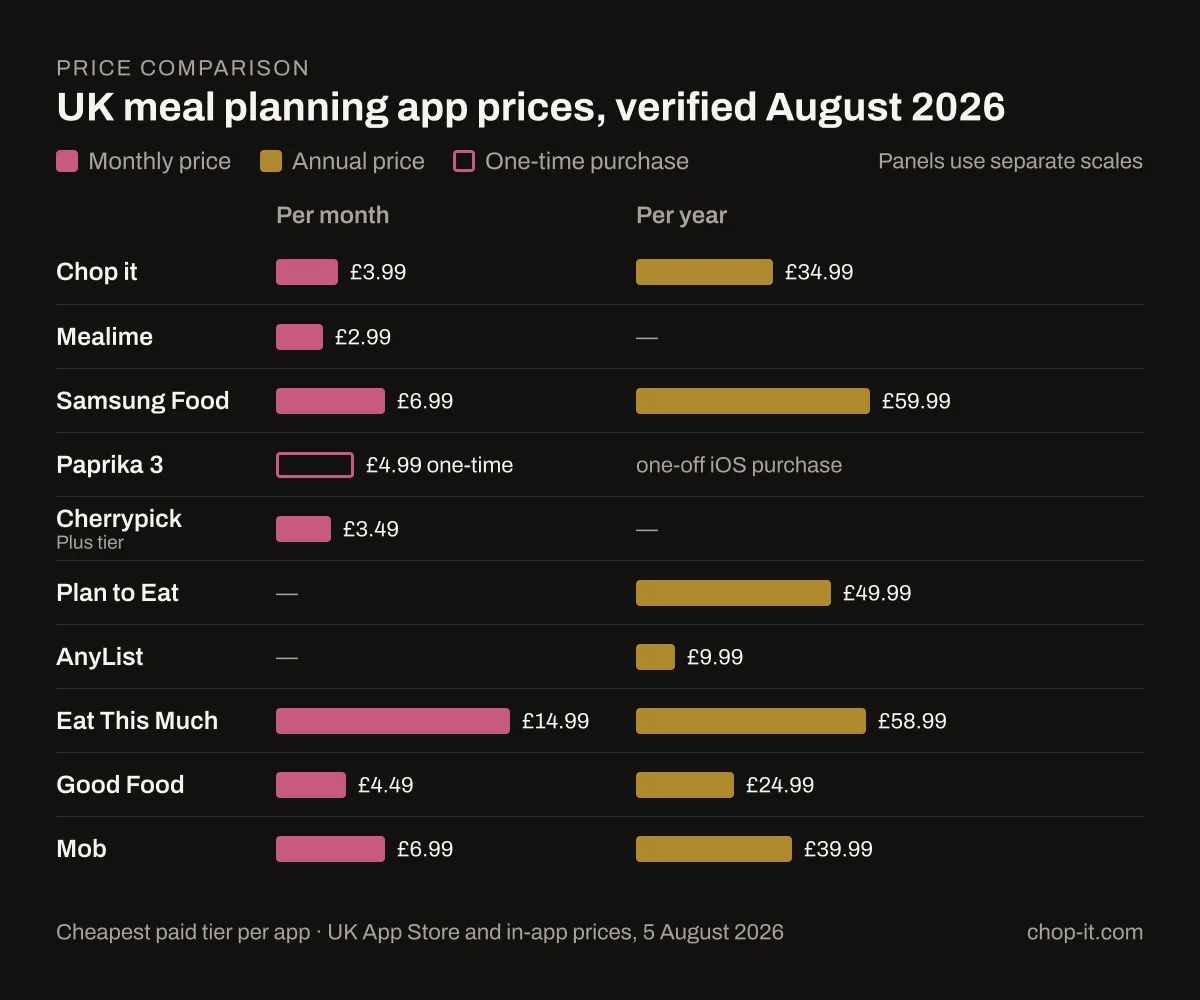
| App | Price (UK, Aug 2026) | Platforms | How the shopping list works | Pantry aware | UK supermarket fit | Free tier |
|---|---|---|---|---|---|---|
| Chop it | Free; Pro £3.99/mo or £34.99/yr; credit packs £5.99 / £54.99 | iPhone, ChatGPT, web recipe pages | Merges duplicate ingredients across the week into one list | Yes, including photo scan | Metric, UK ingredient names | Yes |
| Mealime | Free; Meal Planner Pro £2.99/mo | iOS, Android, limited web | Auto-built and sorted by aisle | No | Generic, no UK retailer link | Yes, generous |
| Samsung Food | Free; £6.99/mo or £59.99/yr | iOS, Android, web | Auto-built from saved recipes and plans | Limited | Broad, not UK-specific | Yes, strong |
| Paprika 3 | £4.99 one-time on iOS; desktop sold separately | iOS, Android, macOS, Windows | Built from recipes you add, grouped by category | No | Whatever you clip | No, paid up front |
| Cherrypick | Free; Plus £3.49/mo, Pro £6.99/mo | iOS, Android | Becomes a basket at Sainsbury's, Tesco or Asda | Yes, fridge and cupboard scan | Direct retailer integration | Yes |
| Plan to Eat | Free app; £49.99/yr after 14-day trial | iOS, Android, web | Built from your planner, grouped by aisle | No | Generic, US-built | Trial only |
| AnyList | Free; Complete £9.99/yr, household £14.99/yr | iOS, Android, web | Shared in real time across the household | No | Generic | Yes |
| Eat This Much | Free; £14.99/mo or £58.99/yr | iOS, Android, web | Generated from a calorie and macro target | No | Generic, US-built | Yes, limited |
| Good Food | Free; Premium £4.49/mo or £24.99/yr | iOS, Android, web | Premium planner builds a list | No | British recipes throughout | Yes, browsing |
| Mob | Free; Premium £6.99/mo or £39.99/yr | iOS, Android, web | Premium plans include a list | No | British recipes throughout | Yes, taster |
Ollie appears on most lists like this one. It is not available on the UK App Store, so it is not in the table. If you have read about it elsewhere and gone looking, that is why you could not find it.
How I compared the meal planning apps
Anyone can win a features checklist. These apps separate on five things that only matter once you are three weeks in.
Getting recipes in. A built-in catalogue is one route. Clipping from a website is another. Photographing a cookbook page, saving a TikTok, keeping something ChatGPT wrote for you: those are the routes most apps still ignore.
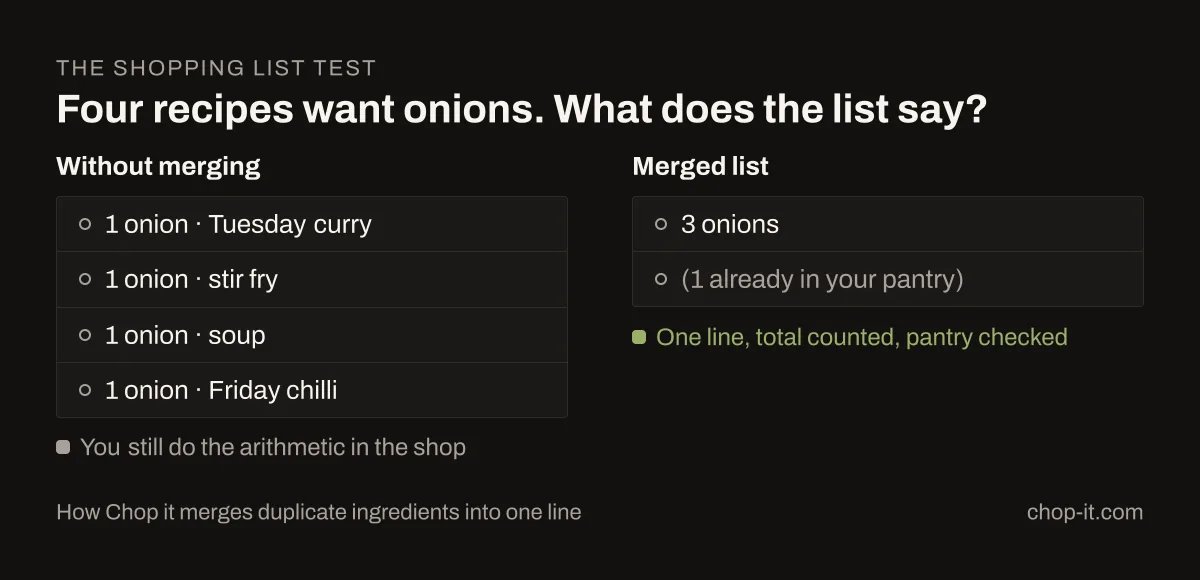
The shopping list. Four recipes each want an onion and you already have one. A good list gives you three onions on one line. A bad one gives you "1 onion" four times, ignores the pantry and leaves the arithmetic to you in the shop. I have written more about how each app handles that merge.
Pantry awareness. You already own rice. An app that knows this writes a shorter list. The mechanics behind all three list jobs are explained in how AI shopping lists work.
Planning the week. A calendar you fill in by hand is not planning. Look for leftovers, repeats and a view of the whole week at once.
Price and platform. A one-off £4.99 and a £59.99 annual subscription are different commitments. So is Android support, or the lack of it.
The best meal planning apps, reviewed
Chop it
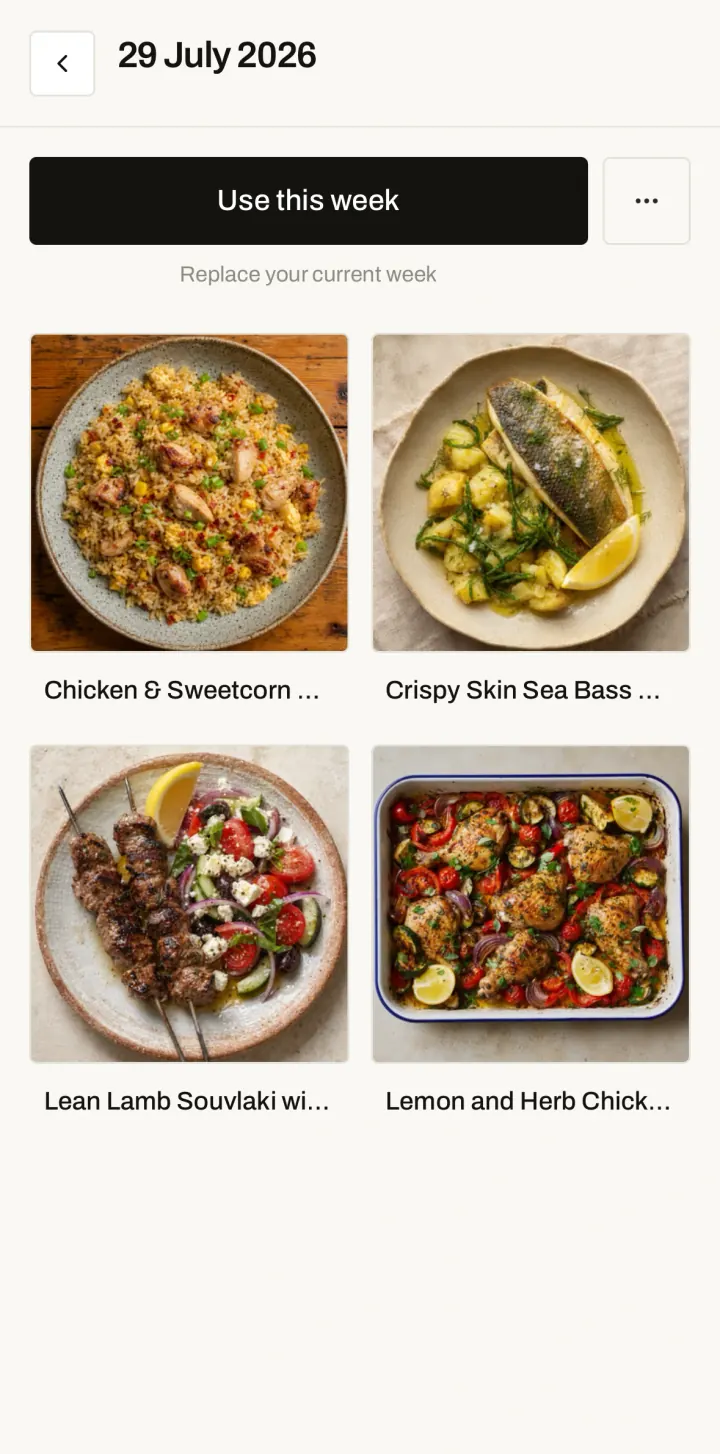
This one is mine, so weigh it accordingly. I built it because a good dinner idea should not vanish when a chat window closes. Recipes arrive from everywhere now, and most apps only accept one or two of those routes. Chop it takes a website link, a photographed cookbook page, a social video or something you created in conversation, and turns each into a structured recipe in the same library. From there you plan the week, merge the ingredients into one list and cook from a clear method.
It also runs inside ChatGPT, where you can find or create a recipe, build a menu and open the result in the app. A walkthrough of every part of the app covers the rest: the Chef IQ catalogue, the Recipe Generator, collections and the pantry.
The honest limitation: it launched in May 2026 and there is no Android app. The built-in catalogue is smaller than a publisher with decades of archive. If you use Android or want the biggest editorial recipe bank, buy something else.
Price: free to start. Pro is £3.99 a month or £34.99 a year. Credit packs are £5.99 for 100 or £54.99 for 700.
Mealime
Mealime does one job properly: choose a few quick dinners, get a clean aisle-sorted list, cook in around half an hour. The allergy and diet filtering is better than most, and the free tier is usable on its own rather than a two-week tease. For a household that wants dinner solved with minimal thought, it is the least demanding app here.
The honest limitation: it is a filtered database that never learns your habits. There is no meaningful calendar, the web version is close to read-only, and it does nothing with the food already in your kitchen. You will re-answer the same questions in month three that you answered in week one.
Price: free, with Meal Planner Pro at £2.99 a month. That is the cheapest paid tier in this comparison.
Samsung Food
Formerly Whisk, and you do not need a Samsung device to use it. This is the most generous free tier of any app here. Save recipes from anywhere on the web, plan them onto a week, get a shopping list built for you, and do all of it on iOS, Android and a real web app. Most competitors charge for that combination.
The honest limitation: the product has grown broad, and finding the feature you want takes longer than it should. The best parts, including AI-personalised plans and the step-by-step cooking mode, sit behind a subscription that costs more per year than any other app in this table apart from Eat This Much.
Price: free core. Premium is £6.99 a month or £59.99 a year with a seven-day trial.
Paprika 3
The recipe manager for people who want to own their collection. Clip from any site, scale the servings, generate a grocery list, sync between devices, and pay once. No renewal, no tier above you, no feature held back. Fifteen years of people migrating their recipes into it says something about how well it holds up.
The honest limitation: it organises what you bring, so it is a filing system rather than a source of ideas. "Pay once" means once per platform: the iPhone app and the Mac app are separate purchases. There is no pantry awareness and no supermarket connection.
Price: £4.99 on the UK App Store, one time. Desktop versions are sold separately.
Cherrypick
The only app here that closes the loop between planning and paying. Choose your recipes and Cherrypick builds the basket at Sainsbury's, Tesco or Asda, with real prices attached, so you see the cost of the week before you commit to it. You can scan your fridge and cupboard so it skips what you already own. For anyone tracking a weekly grocery budget, that is a genuine advantage over every other app in this comparison.
The honest limitation: the retailer integration defines the product, so you are choosing among three supermarkets. Shop at Aldi, Lidl or Waitrose and the main reason to use it disappears. Some features are Sainsbury's only.
Price: free tier. Plus is £3.49 a month and Pro is £6.99 a month, both discounted 25% until 4 September 2026.
Plan to Eat
A planner for people who already have the recipes and want somewhere disciplined to put them. The drag-and-drop calendar is the best in this group, the aisle-grouped list is well organised, and the web app is a full citizen rather than an afterthought. Households that cook from a fixed rotation of family recipes get on with it well.
The honest limitation: it is subscription-only after the trial, at £49.99 a year, with no free tier at all. It was built for a US audience, so ingredient names and quantities lean American and you will do some translating. There is no pantry awareness.
Price: £49.99 a year after a 14-day free trial. Nothing free beyond that.
AnyList
If your actual problem is that your partner is in Tesco while you are at home looking at the fridge, AnyList solves it and nothing else here comes close. The shared list updates in real time, it is organised sensibly, and the household plan covers everyone in the house for £14.99 a year. Recipe storage and meal planning are present and competent.
The honest limitation: the list comes first and everything else runs thinner. As a place to discover recipes or plan an interesting week, it is outclassed by most of this list. You are buying a shared list with a planner attached.
Price: free core. Complete is £9.99 a year for one person or £14.99 a year for a household, the cheapest annual price here.
Eat This Much
The pick if you are cooking to a number. Set a calorie target and macro split, and it builds a week that hits them, then produces the shopping list. Nothing else here automates against a numeric goal in the same way, and for anyone tracking intake for training or medical reasons, that automation is the whole point.
The honest limitation: planning to a target makes for clinical dinners. The recipes serve the numbers rather than the evening. It is also the most expensive option here by a distance, and the monthly price is roughly five times Mealime's.
Price: free basics. Premium is £14.99 a month or £58.99 a year after a 14-day trial.
Good Food
The default for British home cooking, and the reason it stays the default is the archive. A large catalogue of triple-tested recipes from a brand most UK kitchens already trust, with browsing free and no account needed to start. If you want to type "chicken thighs" and get twenty things that will work, this is still the strongest answer.
The honest limitation: the meal planner sits behind Premium, so the free experience is a recipe bank rather than a planning tool. It does nothing with recipes from outside its own catalogue, which is most of them if you cook from social video or AI.
Price: free to browse. Premium is £4.49 a month or £24.99 a year, with a £0.99 annual trial offer running at the time of writing.
Mob
The most distinctive recipe brand here. Strong originals, a clear point of view, and food that looks worth cooking on a Friday. For cooking as a pleasure rather than a logistics problem, Mob is the one that will actually make you want to get the pan out. Recipes are written for British kitchens and British ingredients.
The honest limitation: the full library and the meal plans are behind Premium at £39.99 a year, and it stays a curated publisher rather than a tool for managing your own collection. You cannot bring recipes in from elsewhere and organise them.
Price: free taster. Premium is £6.99 a month or £39.99 a year with a seven-day trial.
ChatGPT on its own
Worth taking seriously as a competitor to every app above, because for a lot of people it already replaced one.
What it does better than anything on this list: improvising. Tell it you have half a cabbage, some feta and forty minutes, and it will give you something plausible to cook. Ask for the same dinner made cheaper, or without dairy, or for a child who refuses anything green, and it adapts without a filter menu. The free tier is enough for this. No app here matches that range.
ChatGPT can remember useful preferences when memory is enabled, but it is not a structured record of your week. A meal plan remains prose in a conversation: there is no dependable week view, persistent tickable list or pantry ledger. Ask on Wednesday what you planned on Sunday and it may help, but you should not rely on it reproducing the exact five dinners and quantities. That gap between generating a recipe and keeping one is worth understanding properly before you decide whether you need an app at all.
Chop it runs inside ChatGPT to close exactly those gaps.
Price: free tier is enough for meal planning. Go is £6.99 and Plus is £19.99 on the UK App Store.
A note on meal kits
If you arrived here thinking of Gousto, HelloFresh or Mindful Chef, those solve a related problem at a different price. A two-person Gousto box works out at £4.65 a portion, £46.49 an order, before delivery. HelloFresh is £5.50 a serving, so three meals for two people comes to £32.99 plus £4.99 shipping. Both advertise a much lower price on a first box, which is not the number you pay in week three, so compare on the standard rate.
Kits take the deciding and the shopping off your hands, and you pay a premium per meal for that. The apps above take the deciding off your hands and leave you buying at supermarket prices, which is where most of the difference sits. I have written a fuller comparison of what the kits cost against a planned week, including Mindful Chef at £7.62 a portion.
How to choose a meal planning app
Most comparisons rank these apps by the size of the built-in recipe catalogue. That made sense when a publisher decided what you cooked. It matters less now that good recipes reach you from a cookbook, a friend's text, a saved video and a chat window in the same week.
The question worth asking is whether an app can turn all of those into something you can find again in March. Can that recipe join a weekly plan, become part of one merged shopping list and open cleanly at the hob, without you copying it between three tools? Paprika answers yes for anything on the web. Samsung Food answers yes for a good deal of it, free. Chop it is built for the case where the sources are genuinely mixed, including the ones that did not exist five years ago.
None of that helps if you stop opening the app. The best meal planning app is the one still on your home screen in week three, so match it to the job in front of you rather than the longest feature list. Browse a few quick weeknight recipes or a batch-cooking set and see which app you would actually want holding them.
Frequently asked questions
What is the best meal planner app in the UK? There is no single winner, because the apps solve different problems. Good Food has the best British recipe archive. Paprika 3 is the best way to own a collection without a subscription. Samsung Food is the strongest free planner. Cherrypick is the only one that prices your basket at a UK supermarket while you plan. Chop it is built for recipes arriving from mixed sources including AI.
Is there a free meal planning app in the UK? Yes, several. Samsung Food has the most capable free tier, covering saving, planning and shopping lists across iOS, Android and web. Mealime's free tier is usable on its own. AnyList and Cherrypick both have free versions, Good Food is free to browse, and Chop it is free to start. Paprika 3 has no free tier because it is a £4.99 one-time purchase instead.
Which meal planning app has the best shopping list? For a shared household list, AnyList. For a list that becomes an actual supermarket basket with prices, Cherrypick. For merging duplicate ingredients across several recipes into single lines, Chop it. Mealime and Plan to Eat both produce clean aisle-sorted lists from your plan.
Can I use ChatGPT for meal planning instead of an app? For coming up with ideas, yes, and the free tier is enough. ChatGPT can remember useful preferences when memory is enabled, but a weekly plan remains prose in a conversation rather than a structured week, running shopping list or pantry record. Either keep using the same chat and accept some manual organisation, or use something built to hold the output.
Which meal planning apps work on Android? Mealime, Samsung Food, Paprika 3, Cherrypick, Plan to Eat, AnyList, Eat This Much, Good Food and Mob all have Android apps. Chop it is iPhone-only at the moment, though the ChatGPT app works on any device.
How much should I expect to pay? The cheapest paid tier here is Mealime at £2.99 a month. The cheapest annual commitment is AnyList at £9.99. Paprika 3 is a £4.99 one-off iOS purchase, with other platforms sold separately. At the other end, Eat This Much is £14.99 a month and Samsung Food is £59.99 a year. Most people should start on a free tier and only pay once they have used an app for a fortnight.
Prices verified on 5 August 2026 from the UK App Store listings for Chop it, Mealime, Samsung Food, Paprika 3, Plan to Eat, Good Food, Mob and ChatGPT, and from in-app subscription screens for Cherrypick, AnyList, Eat This Much and Mob. Gousto pricing from gousto.co.uk; HelloFresh pricing from its own checkout at hellofresh.co.uk, at the standard rate rather than the introductory offer. Subscription prices change often, so check the current listing before you buy.
Quick answers
- What is the best meal planner app in the UK?There is no single winner, because the apps solve different problems. Good Food has the best British recipe archive. Paprika 3 is the best way to own a collection without a subscription. Samsung Food is the strongest free planner. Cherrypick is the only one that prices your basket at a UK supermarket while you plan. Chop it is built for recipes arriving from mixed sources including AI.
- Is there a free meal planning app in the UK?Yes, several. Samsung Food has the most capable free tier, covering saving, planning and shopping lists across iOS, Android and web. Mealime's free tier is usable on its own. AnyList and Cherrypick both have free versions, Good Food is free to browse, and Chop it is free to start. Paprika 3 has no free tier because it is a £4.99 one-time purchase instead.
- Which meal planning app has the best shopping list?For a shared household list, AnyList. For a list that becomes an actual supermarket basket with prices, Cherrypick. For merging duplicate ingredients across several recipes into single lines, Chop it. Mealime and Plan to Eat both produce clean aisle-sorted lists from your plan.
- Can I use ChatGPT for meal planning instead of an app?For coming up with ideas, yes, and the free tier is enough. ChatGPT can remember useful preferences when memory is enabled, but a weekly plan remains prose in a conversation rather than a structured week, running shopping list or pantry record. Either keep using the same chat and accept some manual organisation, or use something built to hold the output.
- Which meal planning apps work on Android?Mealime, Samsung Food, Paprika 3, Cherrypick, Plan to Eat, AnyList, Eat This Much, Good Food and Mob all have Android apps. Chop it is iPhone-only at the moment, though the ChatGPT app works on any device.
- How much should I expect to pay?The cheapest paid tier here is Mealime at £2.99 a month. The cheapest annual commitment is AnyList at £9.99. Paprika 3 is a £4.99 one-off iOS purchase, with other platforms sold separately. At the other end, Eat This Much is £14.99 a month and Samsung Food is £59.99 a year. Most people should start on a free tier and only pay once they have used an app for a fortnight.